I love using emerging
tools, diving into code,
and getting to
prototype my ideas.
I grew up in Kingston 🏛️,
lived in both Montréal 🥯
and Vancouver 🏔️, and
now call Victoria 🌊 home.
I’m a product designer at
with 14 or so years of experience across agencies and startups.

I love using emerging tools, diving into code,
and getting to prototype my ideas.
I grew up in Kingston 🏛️, lived in
both Montréal 🥯 and Vancouver 🏔️,
and now call Victoria 🌊 home.

I love using emerging
tools, diving into code,
and getting to
prototype my ideas.
I grew up in Kingston 🏛️,
lived in both Montréal 🥯
and Vancouver 🏔️, and
now call Victoria 🌊 home.
I’m a product designer at
with 14 or so years of experience across agencies and startups.

I love using emerging tools, diving into code,
and getting to prototype my ideas.
I grew up in Kingston 🏛️, lived in
both Montréal 🥯 and Vancouver 🏔️,
and now call Victoria 🌊 home.

I love using emerging
tools, diving into code,
and getting to
prototype my ideas.
I grew up in Kingston 🏛️,
lived in both Montréal 🥯
and Vancouver 🏔️, and
now call Victoria 🌊 home.
I’m a product designer at
with 14 or so years of experience across agencies and startups.

I love using emerging tools, diving into code,
and getting to prototype my ideas.
I grew up in Kingston 🏛️, lived in
both Montréal 🥯 and Vancouver 🏔️,
and now call Victoria 🌊 home.
Keep scrolling for some of my recent work, from prototypes to finalized UI.
Foundations
Superlist
Shortly after joining the company, I led the creation of the brand visual language and interface design for macOS, web, iOS, and Android.
If you're seeing this, try refreshing the page.
I created the design system that serves as the foundation for all our UI and brand applications. Over the years, I've built several versions, and the latest one is built with variables to make switching between themes or platforms effortless.
Tools used
Keep scrolling for some of my recent work, from prototypes to finalized UI.
Foundations
Superlist
Shortly after joining the company, I led the creation of the brand visual language and interface design for macOS, web, iOS, and Android.
If you're seeing this, try refreshing the page.
I created the design system that serves as the foundation for all our UI and brand applications. Over the years, I've built several versions, and the latest one is built with variables to make switching between themes or platforms effortless.
Tools used
Keep scrolling for some of my recent work, from prototypes to finalized UI.
Foundations
Superlist
Shortly after joining the company, I led the creation of the brand visual language and interface design for macOS, web, iOS, and Android.
If you're seeing this, try refreshing the page.
I created the design system that serves as the foundation for all our UI and brand applications. Over the years, I've built several versions, and the latest one is built with variables to make switching between themes or platforms effortless.
Tools used
If you're seeing this, try refreshing the page.
I designed and rendered the icons for macOS (the animated dock icon took some experimentation to get it working), iOS, and Android using Blender and Spline.
Tools used

If you're seeing this, try refreshing the page.
I designed and rendered the icons for macOS (the animated dock icon took some experimentation to get it working), iOS, and Android using Blender and Spline.
Tools used

If you're seeing this, try refreshing the page.
I designed and rendered the icons for macOS (the animated dock icon took some experimentation to get it working), iOS, and Android using Blender and Spline.
Tools used

If you're seeing this, try refreshing the page.
(Unmute for SFX.) We developed a unique navigation style for the app, allowing nested tasks and lists in various view modes.
Tools used
If you're seeing this, try refreshing the page.
(Unmute for SFX.) We developed a unique navigation style for the app, allowing nested tasks and lists in various view modes.
Tools used
If you're seeing this, try refreshing the page.
(Unmute for SFX.) We developed a unique navigation style for the app, allowing nested tasks and lists in various view modes.
Tools used
If you're seeing this, try refreshing the page.
(Unmute for SFX.) This desktop prototype laid the groundwork for a lot of the core features and sound design in the app today. Although some elements, like the sidebar top grid, were left out of the final version.
Tools used
If you're seeing this, try refreshing the page.
(Unmute for SFX.) This desktop prototype laid the groundwork for a lot of the core features and sound design in the app today. Although some elements, like the sidebar top grid, were left out of the final version.
Tools used
If you're seeing this, try refreshing the page.
(Unmute for SFX.) This desktop prototype laid the groundwork for a lot of the core features and sound design in the app today. Although some elements, like the sidebar top grid, were left out of the final version.
Tools used

As a designer it's been an absolute game-changer contributing directly to our codebase. To date I've shipped 115 PRs, some large and some small, ranging from feature updates to UI fixes.
Tools used

As a designer it's been an absolute game-changer contributing directly to our codebase. To date I've shipped 115 PRs, some large and some small, ranging from feature updates to UI fixes.
Tools used

As a designer it's been an absolute game-changer contributing directly to our codebase. To date I've shipped 115 PRs, some large and some small, ranging from feature updates to UI fixes.
Tools used
AI Voice
Superlist
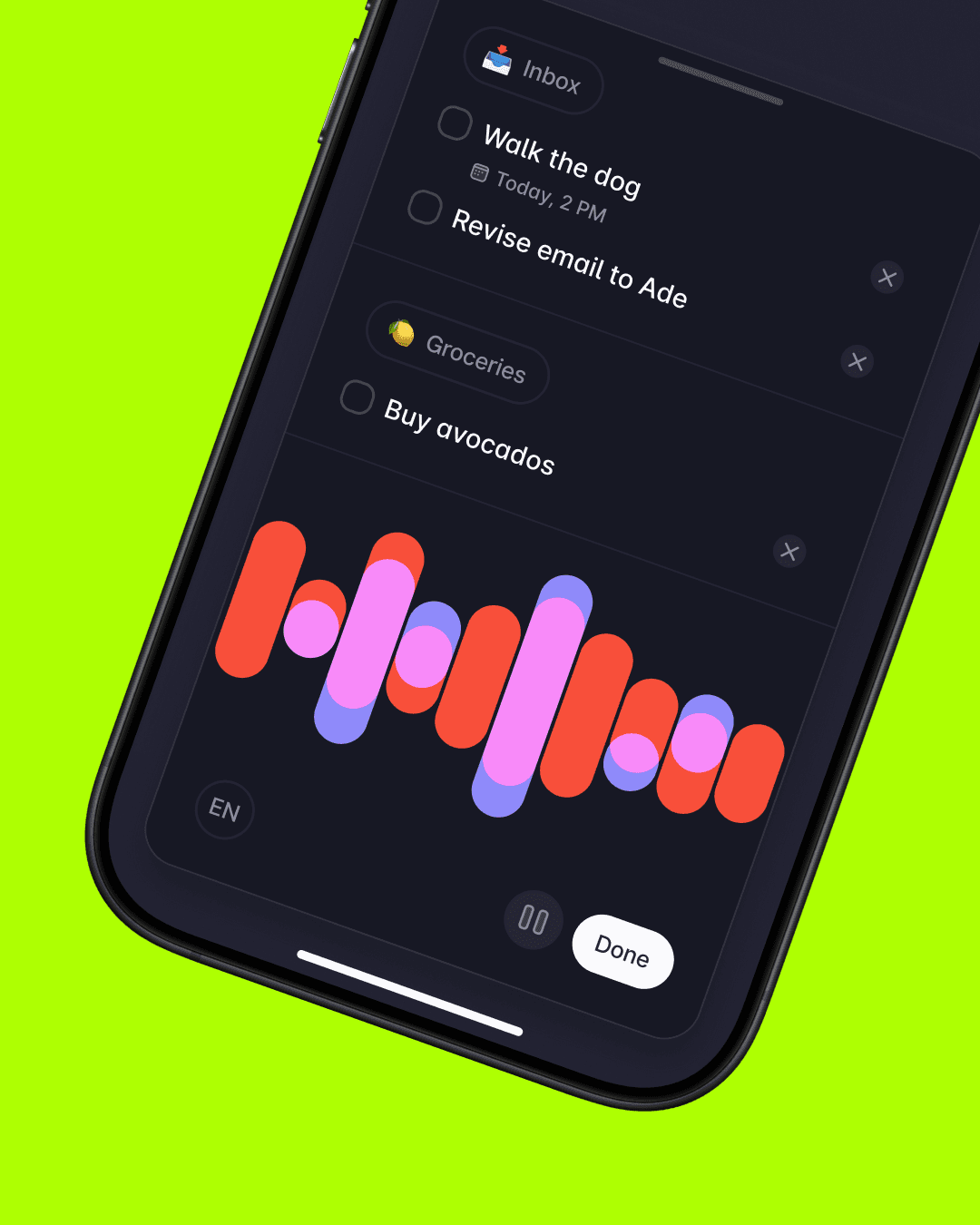
With the arrival of quality AI models, we began integrating them into Superlist to speed up task and list creation (Talk) as well as note capture (Meeting Notes).
If you're seeing this, try refreshing the page.
(Unmute for SFX.) All of our AI features use the same two-tone palette to make them recognizable within the app, and I developed overlapping waveform bars as the defining visual element for our audio UI.
Tools used
AI Voice
Superlist
With the arrival of quality AI models, we began integrating them into Superlist to speed up task and list creation (Talk) as well as note capture (Meeting Notes).
If you're seeing this, try refreshing the page.
(Unmute for SFX.) All of our AI features use the same two-tone palette to make them recognizable within the app, and I developed overlapping waveform bars as the defining visual element for our audio UI.
Tools used
AI Voice
Superlist
With the arrival of quality AI models, we began integrating them into Superlist to speed up task and list creation (Talk) as well as note capture (Meeting Notes).
If you're seeing this, try refreshing the page.
(Unmute for SFX.) All of our AI features use the same two-tone palette to make them recognizable within the app, and I developed overlapping waveform bars as the defining visual element for our audio UI.
Tools used
If you're seeing this, try refreshing the page.
I shifted from animation to code, building a prototype that demonstrated how microphone input could drive smooth transitions between different waveform states.
Tools used
If you're seeing this, try refreshing the page.
I shifted from animation to code, building a prototype that demonstrated how microphone input could drive smooth transitions between different waveform states.
Tools used
If you're seeing this, try refreshing the page.
I shifted from animation to code, building a prototype that demonstrated how microphone input could drive smooth transitions between different waveform states.
Tools used
If you're seeing this, try refreshing the page.
(Unmute for narration and SFX.) Once we were further into the project, I created a series of mobile prototypes to help us evaluate Talk UI options.
Tools used
If you're seeing this, try refreshing the page.
(Unmute for narration and SFX.) Once we were further into the project, I created a series of mobile prototypes to help us evaluate Talk UI options.
Tools used
If you're seeing this, try refreshing the page.
(Unmute for narration and SFX.) Once we were further into the project, I created a series of mobile prototypes to help us evaluate Talk UI options.
Tools used
If you're seeing this, try refreshing the page.
This was one of many Figma prototypes I created as we decided on transitions and patterns for the desktop audio popovers in Meeting Notes and Talk.
Tools used
If you're seeing this, try refreshing the page.
This was one of many Figma prototypes I created as we decided on transitions and patterns for the desktop audio popovers in Meeting Notes and Talk.
Tools used
If you're seeing this, try refreshing the page.
This was one of many Figma prototypes I created as we decided on transitions and patterns for the desktop audio popovers in Meeting Notes and Talk.
Tools used
Concept Apps
Superlist
Over the last year, we've started exploring other app and technology ideas at Superlist, with the goal of either folding them back into the main app, or spinning them off as separate products.
If you're seeing this, try refreshing the page.
(Unmute for SFX.) I created the brand and UI design for Slate, a daily task app that's driven entirely by voice: no typing, just talking. The concept centres on starting each day with a clean slate, with an AI coach helping you stay on track.
Tools used
Concept Apps
Superlist
Over the last year, we've started exploring other app and technology ideas at Superlist, with the goal of either folding them back into the main app, or spinning them off as separate products.
If you're seeing this, try refreshing the page.
(Unmute for SFX.) I created the brand and UI design for Slate, a daily task app that's driven entirely by voice: no typing, just talking. The concept centres on starting each day with a clean slate, with an AI coach helping you stay on track.
Tools used
Concept Apps
Superlist
Over the last year, we've started exploring other app and technology ideas at Superlist, with the goal of either folding them back into the main app, or spinning them off as separate products.
If you're seeing this, try refreshing the page.
(Unmute for SFX.) I created the brand and UI design for Slate, a daily task app that's driven entirely by voice: no typing, just talking. The concept centres on starting each day with a clean slate, with an AI coach helping you stay on track.
Tools used
If you're seeing this, try refreshing the page.
(Unmute for SFX and narration.) For Slate, I designed a pull-to-talk interaction (shown in the brand/UI video above at 00:32) with a custom dynamic island. To bring it to life, I created a React Native shader prototype using Eleven Labs' latest voice models so that the animations would respond to voice input.
Tools used
If you're seeing this, try refreshing the page.
(Unmute for SFX and narration.) For Slate, I designed a pull-to-talk interaction (shown in the brand/UI video above at 00:32) with a custom dynamic island. To bring it to life, I created a React Native shader prototype using Eleven Labs' latest voice models so that the animations would respond to voice input.
Tools used
If you're seeing this, try refreshing the page.
(Unmute for SFX and narration.) For Slate, I designed a pull-to-talk interaction (shown in the brand/UI video above at 00:32) with a custom dynamic island. To bring it to life, I created a React Native shader prototype using Eleven Labs' latest voice models so that the animations would respond to voice input.
Tools used
If you're seeing this, try refreshing the page.
This project aimed to answer what a lightweight AI productivity app could look like on macOS. I built this in Swift to demonstrate one possibility: an app that literally attaches and follows macOS windows and shares data in real-time. One example was how we could transform Slack channel conversations into synchronized team task lists.
Tools used
If you're seeing this, try refreshing the page.
This project aimed to answer what a lightweight AI productivity app could look like on macOS. I built this in Swift to demonstrate one possibility: an app that literally attaches and follows macOS windows and shares data in real-time. One example was how we could transform Slack channel conversations into synchronized team task lists.
Tools used
If you're seeing this, try refreshing the page.
This project aimed to answer what a lightweight AI productivity app could look like on macOS. I built this in Swift to demonstrate one possibility: an app that literally attaches and follows macOS windows and shares data in real-time. One example was how we could transform Slack channel conversations into synchronized team task lists.
Tools used
If you're seeing this, try refreshing the page.
(Unmute for narration.) I built Superlist Zero to explore what an AI-first version of Superlist could look like. Using Next.js wrapped in Capacitor for mobile, this prototype let us test UI concepts alongside AI models.
Tools used
If you're seeing this, try refreshing the page.
(Unmute for narration.) I built Superlist Zero to explore what an AI-first version of Superlist could look like. Using Next.js wrapped in Capacitor for mobile, this prototype let us test UI concepts alongside AI models.
Tools used
If you're seeing this, try refreshing the page.
(Unmute for narration.) I built Superlist Zero to explore what an AI-first version of Superlist could look like. Using Next.js wrapped in Capacitor for mobile, this prototype let us test UI concepts alongside AI models.
Tools used
If you're seeing this, try refreshing the page.
Every now and then I'll switch into brand design mode when we're developing new products. In this case, exploring brand directions for a work-in-progress team productivity app called Surf.
Tools used
If you're seeing this, try refreshing the page.
Every now and then I'll switch into brand design mode when we're developing new products. In this case, exploring brand directions for a work-in-progress team productivity app called Surf.
Tools used
If you're seeing this, try refreshing the page.
Every now and then I'll switch into brand design mode when we're developing new products. In this case, exploring brand directions for a work-in-progress team productivity app called Surf.
Tools used
And now a few things I've made for fun.
If you're seeing this, try refreshing the page.
[NSFW? If you don't like Mike Tyson's butt.]
(Unmute for SFX.) This was a fun vibe-coding experiment to see how far I could get with only 3 image assets and AI to create a web game. It's inspired by this interview with Mike Tyson after his latest fight on Netflix. The game works on desktop and mobile, and has a built in cheat code too.
Tools used
And now a few things I've made for fun.
If you're seeing this, try refreshing the page.
[NSFW? If you don't like Mike Tyson's butt.]
(Unmute for SFX.) This was a fun vibe-coding experiment to see how far I could get with only 3 image assets and AI to create a web game. It's inspired by this interview with Mike Tyson after his latest fight on Netflix. The game works on desktop and mobile, and has a built in cheat code too.
Tools used
And now a few things I've made for fun.
If you're seeing this, try refreshing the page.
[NSFW? If you don't like Mike Tyson's butt.]
(Unmute for SFX.) This was a fun vibe-coding experiment to see how far I could get with only 3 image assets and AI to create a web game. It's inspired by this interview with Mike Tyson after his latest fight on Netflix. The game works on desktop and mobile, and has a built in cheat code too.
Tools used

When your team is primarily based in Europe and your CEO keeps dropping German WhatsApp screenshots in Slack, naturally you spend an hour building a Gemini vision-translation app called 'huh.' Saves a minute each time, and it works in any language… even the made-up ones.
Tools used

When your team is primarily based in Europe and your CEO keeps dropping German WhatsApp screenshots in Slack, naturally you spend an hour building a Gemini vision-translation app called 'huh.' Saves a minute each time, and it works in any language… even the made-up ones.
Tools used

When your team is primarily based in Europe and your CEO keeps dropping German WhatsApp screenshots in Slack, naturally you spend an hour building a Gemini vision-translation app called 'huh.' Saves a minute each time, and it works in any language… even the made-up ones.
Tools used
If you're seeing this, try refreshing the page.
(Unmute for narration and SFX.) This was the very first app I ever designed. Back in 2014, a friend and I created it thanks to a $50,000 grant from the BC government. The concept? Draw a terrible monster, give it a dumb voice, then battle it against your friends (enemies).
Tools used
If you're seeing this, try refreshing the page.
(Unmute for narration and SFX.) This was the very first app I ever designed. Back in 2014, a friend and I created it thanks to a $50,000 grant from the BC government. The concept? Draw a terrible monster, give it a dumb voice, then battle it against your friends (enemies).
Tools used
If you're seeing this, try refreshing the page.
(Unmute for narration and SFX.) This was the very first app I ever designed. Back in 2014, a friend and I created it thanks to a $50,000 grant from the BC government. The concept? Draw a terrible monster, give it a dumb voice, then battle it against your friends (enemies).
Tools used